In AI infrastructure, a “good GPU” is not simply the one with the biggest benchmark number or the most dramatic launch event. It is the one that can keep a model fed, move data efficiently, fit inside a power budget, and do all of that reliably in a data center where dozens or thousands of accelerators have to behave like a single system.
That distinction matters because AI workloads are not ordinary graphics tasks. They are a blend of math, memory movement, networking, and thermal management. A chip can be excellent at matrix math and still struggle in production if it runs out of memory bandwidth, cannot communicate quickly with its neighbors, or requires more power and cooling than a facility can practically deliver. In other words, the GPU is only one part of the machine. The workload decides whether the whole stack works.
AI does not just want compute. It wants sustained feed rate.
The basic job of a GPU is to perform many operations in parallel. For AI, that parallelism is usually applied to linear algebra: multiplying large matrices, moving activations, and updating weights during training. This is why vendors talk so much about TFLOPS, FP16, BF16, FP8, and tensor cores or matrix engines. Those numbers are real, but they are only the starting point.
AI workloads are often limited by how quickly data can be delivered to the compute units. If the chip can do enormous amounts of math but cannot access the next block of weights fast enough, performance stalls. That is why memory bandwidth and memory capacity matter as much as raw arithmetic throughput. A model too large to fit in local memory has to be sharded, streamed, or offloaded, and each of those choices adds latency, complexity, and cost.
For training large models, this becomes especially visible. The system must repeatedly move parameters, gradients, and optimizer state through the accelerator and sometimes across multiple accelerators. For inference, the issue shifts slightly: the system needs enough memory to hold model weights and enough bandwidth to keep token generation responsive, especially under concurrent load. A GPU that looks strong in isolation can become a bottleneck when a serving stack is trying to satisfy many requests at once.
HBM is not a luxury feature; it is the point
High Bandwidth Memory, or HBM, has become one of the defining features of AI-grade GPUs. Unlike conventional graphics cards that rely on GDDR memory, high-end AI accelerators typically use stacked HBM positioned close to the compute die. The benefit is straightforward: much higher bandwidth in a tighter physical footprint, with lower power per bit moved.
That design choice has consequences. HBM is expensive, difficult to package, and constrained by advanced manufacturing capacity. It is one reason AI accelerators command high prices and why supply is often limited not just by the silicon itself but by packaging and memory availability. If you are evaluating a GPU for AI use, memory capacity and memory bandwidth should be treated as first-class specifications, not secondary details buried in a product sheet.
The practical question is simple: can the GPU hold the model and deliver data to its compute engines fast enough to keep those engines busy? If not, the rest of the chip’s advertised performance is mostly theoretical. In enterprise deployments, that question often translates into hard trade-offs between model size, batch size, context length, and latency target.
Interconnect determines whether one GPU behaves like many
Modern frontier AI systems rarely rely on a single accelerator. They are built from racks of GPUs that have to coordinate on one training job or serve one model across multiple devices. That makes the interconnect nearly as important as the GPU itself.
Inside a server, high-speed links such as NVIDIA’s NVLink or similar architectures from other vendors are used to move data between GPUs with much less friction than the CPU-centric paths of older systems. Across servers, Ethernet or InfiniBand fabrics handle distributed training and inference traffic. The faster and cleaner those communication paths are, the less time the system wastes waiting for synchronization.
This matters because many AI workloads are “all hands on deck” problems. A training step may require gradients from multiple GPUs before any device can proceed. If one link is too slow, the whole cluster slows down. In practical terms, a weaker interconnect can erase the advantage of a faster chip. That is why buyers increasingly evaluate not just the accelerator SKU but the entire platform: GPU, NICs, switches, topology, and software stack.
For inference, interconnect matters in a different way. Large language models may be split across multiple GPUs because they do not fit neatly on one device. In that case, communication overhead can become part of the latency budget. The better the interconnect, the more gracefully the system can scale without turning every request into a coordination exercise.
Precision support is about economics, not just speed
AI accelerators are now judged by how efficiently they handle lower-precision formats such as FP16, BF16, and FP8. Those formats reduce memory traffic and increase effective throughput, which is why they matter so much in both training and inference. But the real story is not that lower precision is always better. It is that the GPU must support the right mix of formats accurately enough for the workload and efficiently enough to justify its footprint.
Training often depends on mixed precision: using lower precision where possible while preserving enough numerical stability to keep optimization on track. Inference can also benefit from quantization, especially when latency, throughput, and cost per token matter more than absolute numerical fidelity. A GPU that handles these formats well can deliver more useful work per watt and per dollar. That is a much more important metric for operators than raw peak math rate.
The economic implication is straightforward. If one accelerator can do the same job with less memory traffic, less power, or fewer servers, the total system cost drops. That includes not only hardware acquisition but also power delivery, cooling, networking, floor space, and operations staff. In AI infrastructure, efficiency compounds.
Power and cooling are part of the specification
At the high end, AI GPUs are no longer constrained mainly by what the chip designer can imagine. They are constrained by what a data center can physically support. Power density, rack design, cooling strategy, and electrical distribution all shape which GPUs are usable in practice.
This is why thermal design is inseparable from performance. A chip that sustains high throughput only at the edge of its thermal envelope may look impressive in a lab and disappointing in a real deployment. Data centers care about sustained performance under load, not short bursts. They care about whether a rack can be air-cooled or needs liquid cooling, whether the facility has enough megawatts available, and whether the power budget leaves room for network gear, storage, and overhead.
For operators, “good for AI” often means “fits the power envelope without forcing a redesign of the building.” That is an industrial constraint, not a marketing one. It is also why newer accelerators are frequently discussed alongside cooling infrastructure and utility-scale power procurement. The chip is only as useful as the building that can host it.
Software is the hidden part of the hardware decision
GPU hardware does not exist in a vacuum. A strong AI accelerator needs an ecosystem of compilers, kernels, drivers, framework integrations, and distributed training libraries. If the software stack is immature, the hardware may never reach its theoretical advantage.
For many teams, the relevant question is not “Which GPU is fastest?” but “Which GPU works predictably with our models, frameworks, and deployment tools?” CUDA remains a major force in this market because of its depth and maturity, but it is not the only consideration. Compatibility with PyTorch, TensorFlow, JAX, ONNX tooling, quantization workflows, checkpointing systems, and scheduler integration can determine whether a procurement choice becomes a strategic asset or an expensive maintenance burden.
Software also affects utilization. GPUs are capital-intensive assets, and idle silicon is a direct hit to economics. If a platform makes it easier to pack more requests onto each device, manage memory more efficiently, or reduce engineering time spent on optimization, it can outperform a theoretically stronger competitor in real deployments.
Training and inference ask for different strengths
One reason GPU selection gets messy is that “AI workloads” is not a single category. Training and inference overlap, but they do not optimize for the same thing.
Training emphasizes large-scale parallel math, fast collective communication, and enough memory to hold parameters, gradients, and optimizer state. It is often dominated by throughput and cluster efficiency. Inference emphasizes latency, concurrency, memory footprint, and cost per request or cost per token. A GPU ideal for one may be merely adequate for the other.
This is why some operators split their fleet by role. High-end accelerators may be reserved for model development and large-scale retraining, while lower-cost or more power-efficient devices handle serving. The best AI GPU, then, is not universal. It is workload-specific, budget-aware, and matched to the deployment tier.
What buyers should actually look at
When evaluating GPUs for AI, the most useful checklist is operational, not promotional:
- Memory capacity: Can the model and its working state fit?
- Memory bandwidth: Can the chip keep compute units supplied?
- Interconnect: Can multiple GPUs cooperate efficiently?
- Precision support: Does it handle the formats your stack uses?
- Power and thermals: Can your facility sustain it at scale?
- Software maturity: Will it integrate cleanly with your frameworks and deployment tools?
- Total cost of ownership: Does higher performance reduce enough servers, time, or energy to justify the price?
That list is more useful than any single benchmark because it maps directly to how AI systems are actually built and operated. The best GPU is rarely the one with the flashiest spec sheet. It is the one that keeps the pipeline full, scales without drama, and turns expensive silicon into useful throughput.
The bottom line
A GPU is good for AI when it behaves like infrastructure, not just a chip. It has to move data quickly, communicate cleanly, fit into a power and cooling budget, and slot into a software stack that can make use of it. The most important constraints are often not on the die itself but in the memory subsystem, the interconnect, the facility, and the orchestration layer.
That is why AI hardware buying has become a systems engineering problem. In a world where model size, token demand, and cluster scale keep rising, the most valuable GPUs are the ones that reduce friction across the entire stack. Performance still matters. But in AI, performance only counts when the rest of the system can keep up.
Sources and further reading
- NVIDIA developer documentation and architecture materials
- AMD Instinct accelerator product and platform documentation
- Intel Gaudi AI accelerator documentation
- PyTorch and JAX distributed training documentation
- InfiniBand Trade Association and Ethernet Alliance materials
- JEDEC High Bandwidth Memory specifications
- Uptime Institute guidance on data center power and cooling constraints
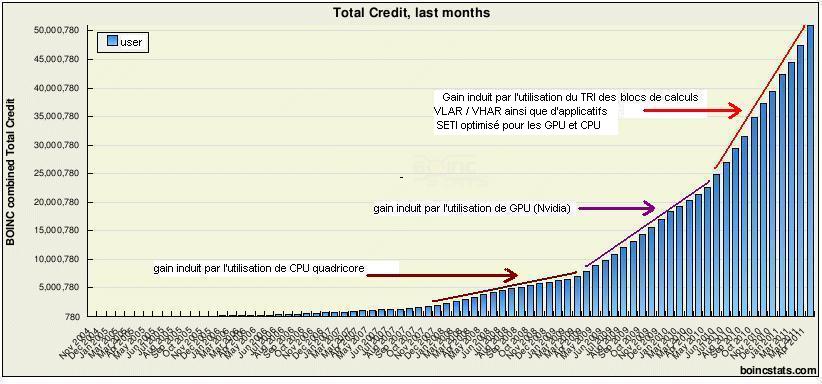
Image: Gain induit CPU- GPU- TRI2.JPG | printed screen of my own statistique from http://boincstats.com/stats/boinc_user_graph.php?pr=bo&id=1210 | License: CC BY-SA 4.0 | Source: Wikimedia | https://commons.wikimedia.org/wiki/File:Gain_induit_CPU-_GPU-_TRI2.JPG